

Top 8 Automation Software Tools (Updated 2025)
n8n for self-hosted automation
Zapier for enterprise AI orchestration
Make – The interface is visual, strong about complex automation, 350+ Connectors AI and Data
Microsoft Power Automate for Microsoft ecosystem automation
Workato: Best for cross-tool process orchestration
UiPath: Best for enterprise-scale agentic automation
Gumloop — Emerging Player for AI Workflow Automation
Lindy — AI Assistant + Automation Hybrid
The Age of AI-Powered Automation in 2025
In 2025, automation is no longer a nice-to-have — it’s a necessity. From startups to global enterprises, teams are using automation software to streamline operations, connect hundreds of apps, and orchestrate AI agents across workflows.
The latest generation of automation tools goes far beyond simple “if this then that” triggers. They now integrate AI models (GPT, Claude, Gemini), business systems (CRM, ERP), and cloud infrastructure into powerful end-to-end workflows. Whether you’re an individual automating emails or a Fortune 500 enterprise running global supply chains, there’s an automation platform built for you.
In this guide, we’ve tested and reviewed the 8 best automation software tools of 2025 — from self-hosted open-source platforms to enterprise-scale orchestration engines.
n8n — Best for Self-Hosted Automation
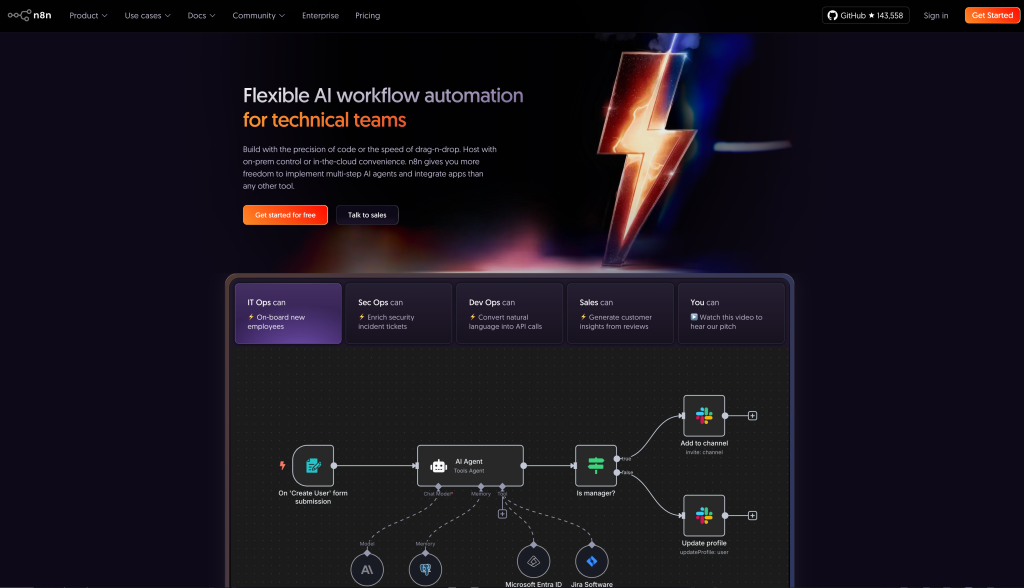
n8n has become the go-to choice for developers and startups that want control, privacy, and flexibility. Unlike cloud-only tools, n8n is open-source and can be deployed on your own server, giving you full ownership of your workflows and data.
It supports hundreds of integrations out of the box and allows you to create complex, multi-step automations with a visual editor. Developers love it because they can extend workflows with custom code nodes, while non-technical users can still build flows visually.
With strong community support and a growing ecosystem, n8n is ideal for teams who want a low-cost, highly customizable alternative to SaaS automation tools like Zapier or Make.
Best for: Startups, developers, and privacy-conscious teams that prefer self-hosted solutions.
Pros:
- Open-source and self-hosted → complete control over data.
- Highly flexible with code + visual workflows.
- Strong community with plugins and templates.
- Cost-effective compared to SaaS platforms.
Cons:
- Requires technical setup and server maintenance.
- Smaller integration library compared to Zapier.
- Learning curve for non-technical users.
Pricing:
- Free open-source version (self-hosted).
- Cloud Pro plan: from $20/month.
- Enterprise pricing available for advanced support.
Zapier — Best for Enterprise AI Orchestration
Zapier remains the most recognized name in automation, and in 2025 it has evolved into a full-fledged AI orchestration platform. With over 6,000 integrations, Zapier is unmatched when it comes to connecting the SaaS tools businesses already use — from Slack and Salesforce to Gmail and Notion.
The standout feature today is Zapier’s AI integration layer. It doesn’t just pass data between apps; it can now trigger AI models (GPT, Claude, Gemini) to process information mid-workflow. That means you can build automations like: “When a lead fills a form in HubSpot → summarize with GPT-5 → push insights into Slack and Salesforce.”
For enterprises, Zapier offers robust governance, team management, and security compliance, making it a safe bet for organizations that need both scalability and reliability.
Best for: Enterprises and teams that need wide integration coverage and advanced AI-driven workflows.
Pros:
- 6,000+ app integrations (largest ecosystem).
- AI orchestration baked into workflows.
- Enterprise-ready with compliance and user management.
- No-code, beginner-friendly interface.
Cons:
- Pricing can get expensive at high volume.
- Complex automations may be harder to manage than in Make.
- Not self-hosted; all workflows run in Zapier’s cloud.
Pricing:
- Free plan with limited zaps.
- Starter plan: from $29.99/month.
- Professional/Enterprise: scales up to thousands of tasks and team collaboration.
Make (formerly Integromat) — Best Visual Workflow Builder
Make (formerly known as Integromat) has established itself as the go-to platform for visual automation. Unlike Zapier’s linear “trigger-action” style, Make uses a drag-and-drop canvas that lets you design complex workflows with branching logic, multiple data streams, and real-time monitoring.
In 2025, Make shines with its 350+ AI and data connectors, giving businesses the ability to orchestrate everything from marketing automations to data pipelines. It’s particularly strong for teams that need multi-step, conditional workflows where one action can trigger several outcomes simultaneously.
Its interface is designed for both non-technical users (who can build visually without coding) and power users (who can add formulas and custom logic). This flexibility makes it one of the most creative and adaptable automation tools available.
Best for: Businesses and teams who want a highly visual, flexible interface for building complex automations.
Pros:
- Drag-and-drop visual editor for complex workflows.
- 350+ AI and data connectors.
- Real-time monitoring and scenario testing.
- Handles multi-branch, conditional automations.
Cons:
- Learning curve for newcomers (more complex than Zapier).
- Performance can slow with very large workflows.
- Pricing scales quickly with execution volume.
Pricing:
- Free plan with 1,000 operations/month.
- Core plan: from $9/month.
- Pro/Enterprise: advanced features and higher limits.
Microsoft Power Automate — Best for Microsoft Ecosystem
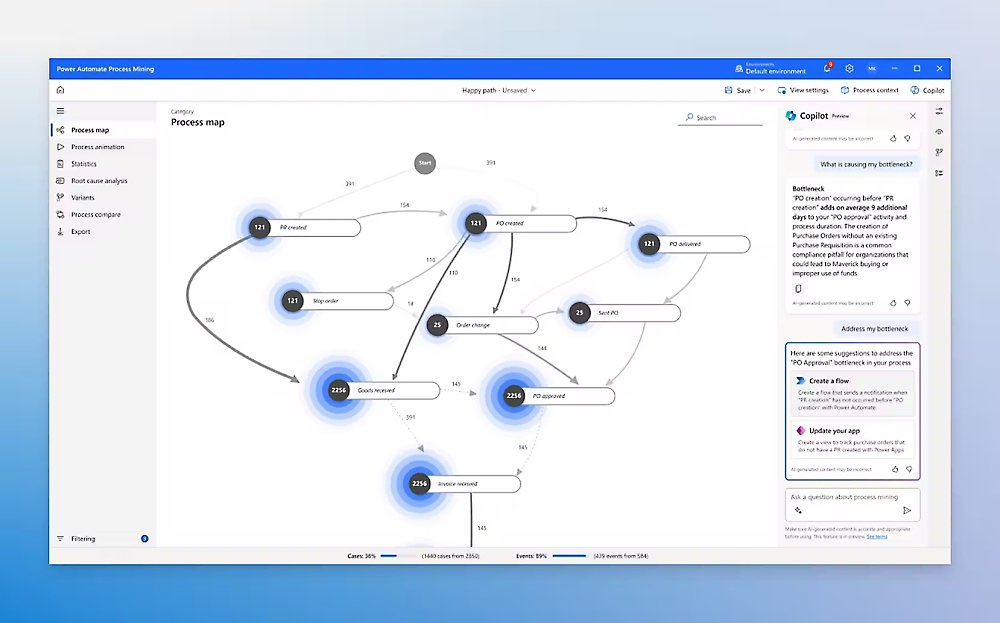
Microsoft Power Automate (formerly Flow) is the centerpiece of automation within the Microsoft ecosystem. By 2025, it has become an essential tool for enterprises already invested in Office 365, Teams, Dynamics 365, and Azure.
Power Automate combines RPA (Robotic Process Automation) with AI Builder, allowing organizations to automate not only cloud workflows but also desktop processes and legacy systems. For example, you can connect Excel data to SharePoint, trigger alerts in Teams, and even control on-premise applications with bots — all from a single platform.
Its tight integration with Microsoft services makes it the most natural choice for businesses standardized on Microsoft. And with Copilot for Power Automate, users can now build flows simply by describing them in natural language.
Best for: Enterprises already using Microsoft Office 365, Teams, and Dynamics, seeking end-to-end automation within the Microsoft stack.
Pros:
- Deep integration with Microsoft ecosystem (Office, Teams, Azure, Dynamics).
- Combines RPA + cloud workflows.
- Natural language automation building with Copilot.
- Enterprise-grade compliance and security.
Cons:
- Best suited for Microsoft-heavy environments.
- Can feel clunky for users outside the MS ecosystem.
- Pricing can escalate for RPA bots and advanced AI features.
Pricing:
- Included with Microsoft 365 (basic flows).
- Premium plans: from $15/user/month.
- Additional charges for RPA bots and AI Builder credits.
Workato — Best for Cross-Tool Process Orchestration
Workato has positioned itself as a leader in enterprise automation and integration. By 2025, it’s the tool of choice for large organizations that need to connect hundreds of apps, departments, and workflows into a single, orchestrated system.
Unlike simpler tools focused on individual zaps or flows, Workato is designed for process orchestration — coordinating actions across multiple systems and teams. For example, an HR workflow might connect Workday → Slack → Salesforce → Jira, ensuring smooth handoffs without human intervention.
Workato also emphasizes collaboration between IT and business teams. With low-code/no-code options for non-technical staff and advanced customization for developers, it bridges the gap between business needs and technical implementation.
Best for: Enterprises that require robust, cross-departmental automation with strong governance and scalability.
Pros:
- Excellent for process orchestration across tools.
- Balances no-code simplicity with developer extensibility.
- Strong governance, monitoring, and compliance features.
- Enterprise integrations with ERP, CRM, HR, and IT systems.
Cons:
- Expensive compared to SMB-focused tools.
- Best value mainly for mid-to-large enterprises.
- Setup and governance require dedicated IT involvement.
Pricing:
- No free tier.
- Custom enterprise pricing based on number of apps, workflows, and usage volume.
UiPath — Best for Enterprise-Scale Agentic Automation
UiPath has long been a leader in RPA (Robotic Process Automation), and in 2025 it has evolved into a platform for agentic automation — combining bots, AI models, and orchestration layers to manage thousands of business processes at scale.
Enterprises use UiPath to automate everything from finance and HR workflows to IT operations and customer support. Its strength lies in combining traditional RPA (interacting with legacy systems, desktop apps, and structured data) with modern AI copilots and agents that can interpret unstructured data, make decisions, and collaborate with human employees.
UiPath also provides strong compliance, monitoring, and governance features, making it a trusted choice for regulated industries like banking, insurance, and healthcare.
Best for: Large enterprises with complex, regulated processes that need both RPA and AI-driven automation at scale.
Pros:
- Industry leader in RPA + AI agentic automation.
- Scales to thousands of processes and bots.
- Enterprise-grade governance, compliance, and monitoring.
- Strong ecosystem of integrations and training resources.
Cons:
- Overkill for startups or small teams.
- Requires significant setup and IT resources.
- Higher cost compared to SMB-friendly automation tools.
Pricing:
- Free Community Edition for individuals.
- Enterprise pricing: custom quotes based on deployment scale, bots, and features.
Gumloop — Emerging AI Workflow Automation
Gumloop is one of the newest players in the automation space, but by 2025 it has gained traction as a lightweight, AI-first alternative to giants like Zapier and Make. Its main appeal is simplicity: Gumloop is designed for individuals, freelancers, and small businesses that want to connect apps and automate tasks without the complexity or cost of enterprise-grade platforms.
What sets Gumloop apart is its AI-native approach. Instead of just linking apps, it allows users to embed AI-powered actions (summarization, text generation, data transformation) directly into workflows. This makes it especially appealing for marketing teams, creators, and small startups experimenting with AI-enhanced productivity.
Best for: Freelancers, solopreneurs, and SMBs looking for simple AI-driven automation without enterprise overhead.
Pros:
- AI-native automation features.
- Simple, intuitive workflow builder.
- Affordable compared to enterprise tools.
- Good for marketing, content, and small-team productivity.
Cons:
- Still a new platform with limited integrations.
- Less powerful for complex, multi-branch workflows.
- Not yet proven at enterprise scale.
Pricing:
- Free tier with limited tasks.
- Paid plans starting from ~$10–$15/month.
Lindy — AI Assistant + Automation Hybrid
Lindy is redefining automation in 2025 by blending personal AI assistant capabilities with traditional workflow automation. Marketed as a “personal AI COO,” Lindy doesn’t just execute tasks — it can plan, delegate, and coordinate work across tools and teams.
Unlike platforms that focus purely on connectors and triggers, Lindy is designed to feel like a human teammate. You can ask it in natural language to “set up a hiring funnel,” “manage my calendar,” or “create an onboarding workflow”, and Lindy builds the automations behind the scenes.
It integrates with common SaaS tools (Slack, Gmail, Notion, Google Calendar, Trello, etc.) and leverages AI reasoning to decide how and when tasks should be executed. This positions Lindy halfway between a chatbot assistant and an automation platform.
Best for: Individuals, solopreneurs, and small teams who want an AI that feels like a personal operations manager.
Pros:
- Natural language interface for building automations.
- Feels like a personal assistant rather than a tool.
- Strong SaaS integrations for productivity and team workflows.
- AI-driven reasoning for task orchestration.
Cons:
- Newer platform, ecosystem still maturing.
- Less suited for highly complex enterprise workflows.
- Pricing not yet as competitive as established tools.
Pricing:
- Free tier with limited workflows.
- Pro plans starting around $20–$25/month.
Quick Comparison Table
| Rank | Tool | Best For | Pros | Cons | Pricing |
|---|---|---|---|---|---|
| 1 | n8n | Self-hosted automation | Open-source, privacy-first, flexible with code & visual flows | Requires setup & maintenance, smaller integration library | Free self-hosted; Cloud from $20/mo |
| 2 | Zapier | Enterprise AI orchestration | 6,000+ integrations, AI triggers, enterprise-ready | Expensive at scale, cloud-only | Free tier; Paid from $29.99/mo |
| 3 | Make (Integromat) | Visual workflow builder | Drag-and-drop canvas, 350+ AI connectors, real-time monitoring | Steeper learning curve, pricing scales with usage | Free 1,000 ops; Paid from $9/mo |
| 4 | Microsoft Power Automate | Microsoft ecosystem | Deep Office/Teams/Dynamics integration, RPA + AI Builder | Best for Microsoft stack, extra cost for RPA bots | Included in MS 365; Premium from $15/user/mo |
| 5 | Workato | Cross-tool orchestration | Enterprise-grade, IT + business collaboration, strong compliance | Expensive, setup requires IT resources | Custom enterprise pricing |
| 6 | UiPath | Enterprise-scale agentic automation | Leader in RPA + AI, scalable, strong governance | Overkill for SMBs, costly setup | Free Community; Enterprise custom pricing |
| 7 | Gumloop | AI-first SMB automation | Simple, affordable, AI-native workflows | Limited integrations, not enterprise-scale | Free tier; Paid ~$10–15/mo |
| 8 | Lindy | AI assistant + automation hybrid | Natural language automation, feels like AI COO, strong SaaS integrations | New platform, smaller ecosystem | Free tier; Pro ~$20–25/mo |
Conclusion
Automation in 2025 has grown beyond simple “if-this-then-that” tasks. Today’s platforms combine AI orchestration, agentic workflows, and enterprise-grade RPA to handle everything from marketing campaigns to global business operations.
- n8n leads for self-hosted, privacy-first automation.
- Zapier and Workato dominate in enterprise-scale orchestration.
- Make shines as the most visual tool for complex, creative workflows.
- Microsoft Power Automate and UiPath are must-haves for enterprises invested in Microsoft or heavy RPA.
- Gumloop and Lindy bring fresh, AI-native approaches for individuals, SMBs, and solopreneurs.
The bottom line: there’s no single “best automation tool.” The right platform depends on your tech stack, scale, and goals. Start with free tiers or trials, test them against your workflows, and invest in the one that aligns with your growth.
FAQ
Which automation tool is best for enterprises in 2025?
UiPath and Workato are the strongest for enterprise-scale operations, while Zapier is trusted for wide SaaS coverage.
What’s the best free automation tool?
n8n (self-hosted) is the most powerful free option. Make and Gumloop also offer generous free tiers for smaller teams.
Is self-hosted automation safer than cloud?
Yes. Tools like n8n give you full control over your data. However, cloud platforms (Zapier, Make) are easier to scale and manage.
What’s the difference between RPA and AI orchestration?
RPA (UiPath, Power Automate) automates repetitive desktop/legacy tasks. AI orchestration (Zapier, Workato) coordinates complex, multi-app workflows and integrates AI models.
Can automation tools replace human workers?
Not entirely. They remove repetitive tasks and speed up processes, but humans remain essential for strategy, oversight, and exception handling.
Related reading:
- The Ultimate Guide to Make Money Online in 2025 | Ranked by ROI & Difficulty
- What Is Jetpack? How to Use Jetpack Plugin to Optimize WordPress Website (2025 Guide)
- What is LLM SEO and Why Does it Matter in 2025
- Ahrefs SEO Guide 2025: How to Use Ahrefs Like a Pro
- How to Install and Use Rank Math SEO Plugin in WordPress (2025 Full Guide)